Google Link Operator Not Working & Link Command is Dead

Google has put the last nail to it’s Link Operator after shutting the Google Toolbar PageRank (PR). Last year around the month of Feb, 2016 there were some chatters that Google Link Operator is not working and is showing signs of being turned off. And after the gap of 11 months it seems that Google Link Operator is finally dead. Google has also removed the Link Search Operator from the list of search operators on its official Search Operators page.

Now only the following search operators are working according to the Google page:
site:
related:
OR
info:
cache:

There is no place for Google Link Operator in the above list. Now when you search link:www.examplesite.com, Google is showing bolded words link and example site name in its search results.


Its good as the link operator was not working properly for many years. It was inconsistent and it never showed the right number of links. Now, website owner have to look into their Google Search Console for the link to their website or look for third party software or resources to get the links.

Google Doodle For Annie Besant 168th Birthday

Annie Besant was born on 1 October, 1847 in London into a middle-class family of Irish origin. Today's her 168th birth anniversary (in 2015) is marked by a doodle on Google India's homepage. Google Doodle honours Annie Wood Besant, a prominent British socialist, theosophist, women's rights activist, writer and orator and supporter of Irish and Indian self-rule.


Happy 17th Birthday Google

Though Google was incorporated as a privately held company on September 4, 1998, Google's birthday has shifted around over the years, but it currently is celebrated on September 27th. Google is celebrating it's 17 birthday on September 27, 2015. Here, is the Google Doodle for Google's 17 Birthday


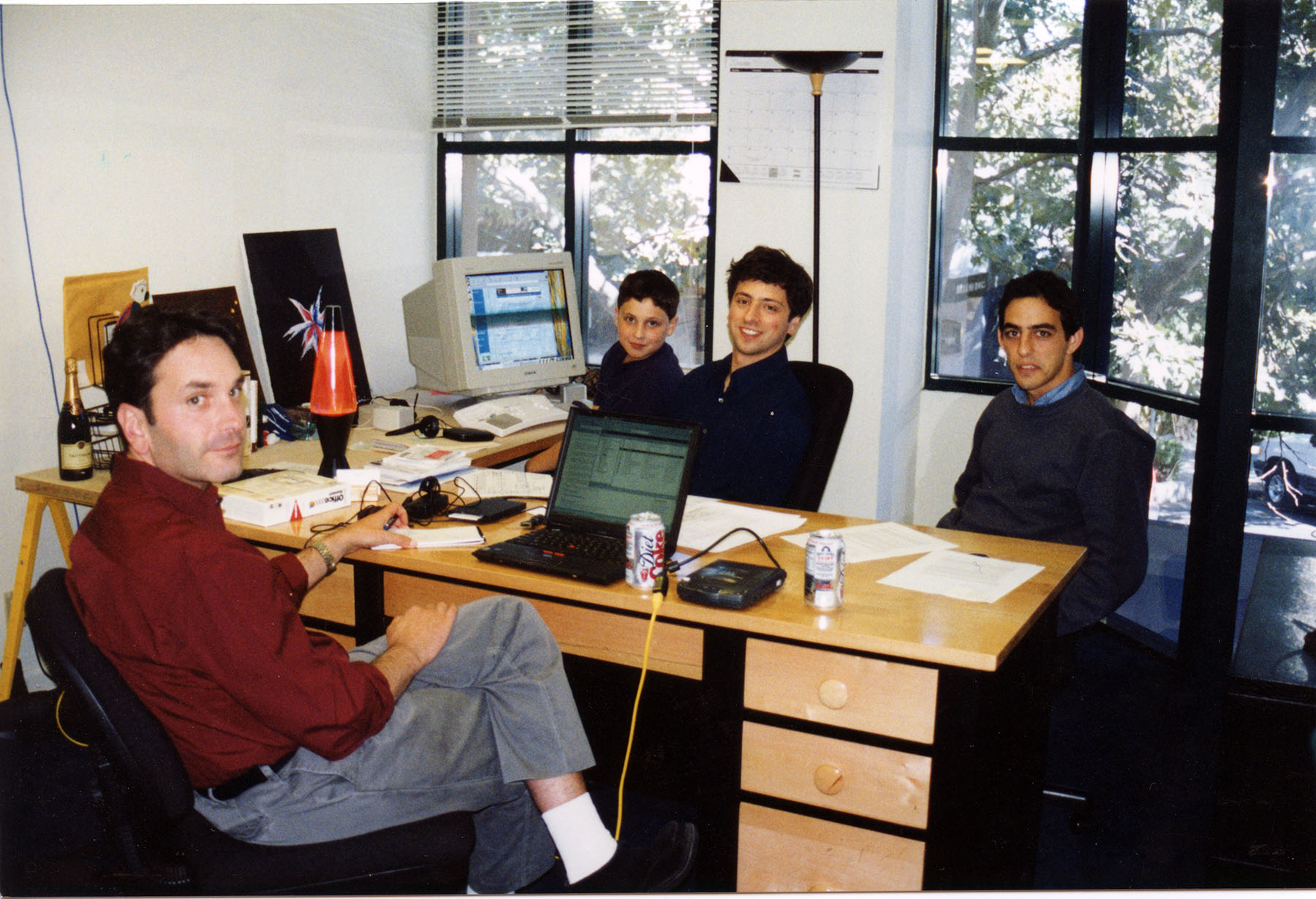
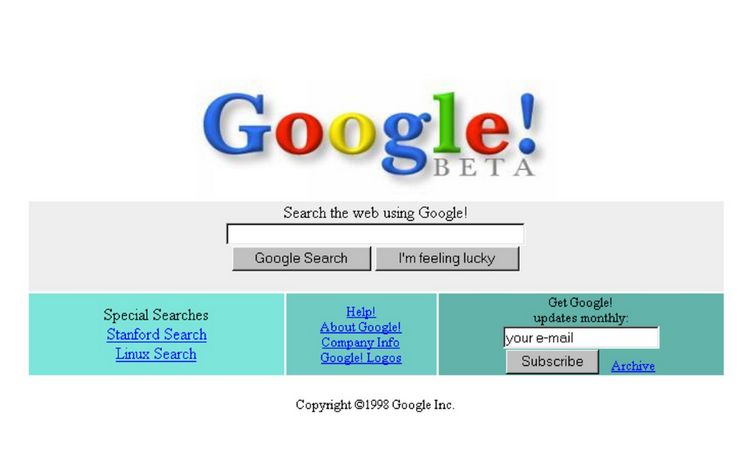
With this Google Doodle, Google want to take a look at its beginning with the first homepage shown on an old computer monitor, Linux Penguin sitting besides the PC, Lava Lamp used to be on on Sergey Brin desk etc.


According to Google, here are the details about the Google Birthday Doodle:

In the world of computer programming, 17 is widely considered the least random number. To assume we made it this far without a little luck, though, would be like assuming lava lamps, turtlenecks, and servers held together by building blocks are harbingers of success. For our 17th birthday, we offer a glimpse into our humble beginnings, when branded hockey jerseys were cool and Savage Garden had a number-one single.

Sometimes you just gotta work with what you have. That’s how you end up with a server made up of toy building blocks.
Not sure what’s more of a relic from a bygone era, the lava lamp or the computer monitor.Linux penguin was always in search of frosty beverages. Naturally.
Inside Google’s first office, also known as Larry and Sergey’s Stanford dorm rooms. They had to find alternative arrangements when the Stanford IT department complained they were sucking up all the bandwidth.

Google’s first homepage (It worked better than it looked.

The office (and attire) may have changed, but the people are still what matter the most.


Google Cache Page Design Change:

Google has change the way it used to show the Google Cached pages many times. Changed the design and also the url http://webcache.googleusercontent.com/ for showing Google Cache.

Earlier, when user used to see the Google Cache of any website from Google search page, they were shown the searched term highlighted.


But Google stopped to show highlighted terms on its cached pages and suggested users to use ctr+f to find the searched term.


Now, today, Google has again changed the Cache snapshot view. Now you can view the "full version", "text only version" and "View source" directly from the cache page. But still the highlighted search terms are missing.


Highlight Google Cache Search Term:

To achieve keyword highlighted in the Cached page view, there are two options. Manually or using the Browser Extensions.

Manually, we can add the wanted words to the q parameter, and let's say we search Google India and want to highlight words: Google India. Our original cache url which is not highlighting any term is:
http://webcache.googleusercontent.com/search?q=cache:Iu-EGyaLG_QJ:https://www.google.co.in/+&cd=1&hl=en&ct=clnk&gl=in

But now, we change the URL by adding the terms google india, by replaceing +&cd to +google+india&cd.
http://webcache.googleusercontent.com/search?q=cache:Iu-EGyaLG_QJ:https://www.google.co.in/+google+india&cd=1&hl=en&ct=clnk&gl=in

Simply, just add your searched terms after the + in the url and you will get to see highlighted search terms.

Also, by using following Browser Extensions (no affiliation with the extension, use at your own risk), one can highlight the searched term:

Chrome

Tampermonkey Extension
https://chrome.google.com/webstore/detail/tampermonkey/dhdgffkkebhmkfjojejmpbldmpobfkfo

Google Cache Highlight Search Query Terms for HTTPS (I am the author of this script)
https://userscripts.org/scripts/show/154167

Firefox

Greasemonkey Extension
https://addons.mozilla.org/en-US/firefox/addon/greasemonkey/

Google Cache Highlight Search Query Terms for HTTPS (I am the author of this script)
https://userscripts.org/scripts/show/154167

Google Wishes Teacher's Day by Teacher's Day Doodle


Google Webmaster Tools Search Queries Report Missing Data

Site GWT Dashboard reporting error in Search Queries Data.
Hm. Something isn't right. We're checking into it now.

Site GWT Search Queries Top Queries Tab reporting error in Data.
Hm. Something isn't right. We're checking into it now.
Please let us know in our Help Forum.

So, is site GWT Search Queries Top Pages Tab reporting error in Data.
 Hm. Something isn't right. We're checking into it now.
Please let us know in our Help Forum.

Now Signed in Google Users can Show or Hide Private Search Results

When signed in, Google is now giving the option to turn of search personalization direct on the search result page. There are two options when Google is showing private results. The options are not available for all queries. But as per my knowledge only when you have shared or your friends have shared something related to the search query via Google+.

Here, is the screen capture for the two queries one showing private result options and other not:

Show Hide Private Search Results Options in Google Search Page
Show Hide Private Search Results Option is Missing in Google Search Page
When the Globe icon is selected, the private data is hidden but when Human icon is selected the search result is showing private results also. And as per my finding, "Currently showing private results" i.e. Human icon is by default selected. Means by default you will get personalised results in Google search

Disable/Hide Private Results on Google Search

You can easily hide your private results being shown in Google Search results. When login, you just have to visit this Search Settings link: https://www.google.com/preferences?hl=en. Scroll a bit and check the "Do not use private results" radio button.

Private results

Private results help find more relevant content for you, including content and connections that only you can see.
Use private results
Do not use private results

Earth Day 2014 Google Doodle


April 22, 2014 is celebrated as Earth Day around the world. Google too is celebrating 2014 Earth Day via it's interactive doodle on the search home page.

Featuring on the Google's homepage, is an interactive Google Doodle, that changes after every click. With each click, user get the option to change the doodle and option to share or search for that specific animal in the Doodle. This year, Google Doodle for Earth Day 2014 has a lot to say via Rufous Hummingbird, Dung Beetle, Moon Jellyfish, Chameleon, Puffer Fish and Japanese Macaque. 

Images Google Doodle Earth Day 2014

For Earth Day 2014, Google has created 6 different Google Doodles to display wildlife and sea life. Following are the six Google Doodle for Earth Day:

Chameleon Google Doodle Earth Day 2014


Dung Beetle Google Doodle Earth Day 2014

Rufous Hummingbird Google Doodle Earth Day 2014

Japanese Macaque Google Doodle Earth Day 2014

Moon Jellyfish Google Doodle Earth Day 2014

Puffer Fish Google Doodle Earth Day 2014

Google Celebrating it's 15th Birthday with Piñata Game


Google is celebrating it's 15th birthday by displaying an interactive Doodle based on Mexican Piñata game on it's search page. Piñata is a decorated container, made up of papier-mâché, pottery or cloth and is filled with small toys or candy or both. You have to hit the Piñata blind folded to get the goodies and sweets. The Piñata is one of many traditions which are typical of Mexico and is now part of Google legacy.

Search "Google In 1998" For A Flashback

On it's 15th birthday, Google is giving chance to it's users to go to flashback of Google in 1998. Search "Google In 1998" on Google and you will be taken back to what Google was in 1998.

Google Opened Menlo Park House & Garage


Google also opened the Menlo Park house and garage, where the company first started its business. It was opened to the media to celebrate the company's 15th birthday. The garage was rented to Google by Susan Wojcicki, sister of Anne Wojcicki wife of Sergey Brin. Susan Wojcicki, was one of the first hires by Brin and Page in Google Team.

Google Going To Discontinue Ad Planner
Just got to know that Google is going to replace Ad Planner with Google Display Planner. I was using the Ad Planner tool and suddenly got the following message popping up:

At the beginning of September, 2013, we are discontinuing Ad Planner. We hope you'll enjoy Google Display Planner which offers an even better ad planning experience. For information on exporting your site lists, visit our Help Center.
Looks like Google is making a good overhaul for all the tools related to Adwords.


Google has finally replaced the free Google AdWords Keyword Tool with Keyword Planner. As of today, Tuesday,27 August, 2013, when you click on the link of Google Keyword Tool, you will be redirected to Adwords support page explaining about the new Keyword Planner.

Earlier AdWords Keyword Tool was accessible without any login. But now to access the new Keyword Planner, users have to login to their AdWords Account. According to Google, Keyword Planner is built with the aim to bring the functionality of both Keyword Tool and Traffic Estimator. To know more visit Keyword Planner.

Gmail Stealth Ads in Promotion Tab

There is a discussion online that search engines are fading the backgrounds of ads in search results to make them difficult to differentiate between the organic or paid of the search results.  You  can read in detailed in this post. Fearing of Google and Matt Cutts action, I have nofollow the link. Well, back to the ads that are getting difficult to figure out day by day shows how Search Engine big daddies are trying to monetize more, earn more and more from their loyal users. 

Taking this step further, Google is moving ahead of others. They now have stealth the ads as mail in the Gmail's Promotion tab. Here is the screen shot of ads in Gmail inbox:

From above screen capture its difficult to differentiate ads and original promotional mails. Flip your laptop screen to figure out which are ads or mails.

From this, there is always a doubt in the intention of Google's new inventions. The timing of these ads and recent launch of Tabs in Gmail shows that the intention was already set to use this to target users and fool them to click on those ads. Since, these ads are charged only for once you click to the ad and then the motive of Google is fulfilled. On clicking, we get the original Google promotional mail:
The mail stats on the right hand side:
What's this?
It's a new type of ad which you can forward to a friend, or star to save it to your inbox. If you dismiss this ad, you won't see it again.
In start, I thought Google has done a great job to differentiate between different types of mail and classifieds them in different tabs. Indeed they had, but why they are fooling users with the similarity to that of inbox inline.

India's Independence Day Doodle By Google

On Google India homepage, a tri-colored ribbon spelling out Google for its logo, also known as Google Doodle is placed to celebrate India's 67th Independence Day.

Google Celebrating Rosalind Franklin 93 Birthday with Google Doodle

Google has posted a doodle on it's homepage to celebrate the 93rd birthday of Rosalind Franklin. The second 'O' in the doodle houses an image of Rosalind Franklin, while the letter 'L' has been replaced with the DNA double helix.

About Rosalind Elsie Franklin:

Rosalind Elsie Franklin (25 July 1920 – 16 April 1958) was a British biophysicist and X-ray crystallographer who made critical contributions to the understanding to the understanding of the fine molecular structures of DNA, RNA, viruses, coal, and graphite. source:wikipedia

Gmail Down - 502 Server Error

May 13, 2013, for last few minutes I am unable to access Gmail. I tried many times but every time getting following error:
502. 
That’s an error.
The server encountered a temporary error and could not complete your request.
Please try again in 30 seconds.
That’s all we know.


Gmail on my mobile is also not working. Giving same error 502 Server Error 


Google's Special Search features to show Recent Earthquake:

There was a small earthquake today at around 12.30 in the noon. According to US Geological Survey and the Google search result for the query, the quake was of magnitude 4.6. 

There is a special search feature in Google to get information about recent earthquakes.

Earthquakes

To see information about recent earthquakes in a specific area type “earthquake” followed by the country, city and state or U.S. zip code. For recent earthquake activity around the world simply type “earthquake india” in the search box.
Example:  

Here, are the two images captured at different time for the search query "earthquake india". Google did try to give the earthquake related search result in real time, but it was bit little late as compare to local newspaper or Google own property Google News.


The difference in time might be due to Google picking up the results from USGS

Yahoo Mail System Down

Yahoo Mail System Down: Thursday, November 29, 2012

I tried to login to my Yahoo Mail account and got following error message:

We're experiencing some technical difficulties...

We’re sorry, but Yahoo! Mail can't load due to a temporary error. You can try back again shortly, or visit our help pages for ways to troubleshoot the issue.
Temporary error: 15

When tried again got an error, but a different one:

Scheduled Maintenance

We are undertaking some essential, but extensive maintenance to improve Yahoo! Mail. During the maintenance period, some users may experience problems accessing Yahoo! Mail.

We sincerely apologize for this inconvenience. Your account is in great shape and we are working to have it available again as quickly as possible.

Yahoo! Mail Team

Google have yet again update the favicon for its Web Search product Google Search. The new favicon is in blue base with white g.


According to Symantec Norton Antivirus Tool, URL used by Google to show Cache version of the site webcache.googleusercontent.com 

Malicious Web Site Blocked

You attempted to access:
http://webcache.googleusercontent.com/search?q=cache:GMkXTe0xUfsJ:www.wikipedia.org/+&cd=1&hl=en&ct=clnk&client=firefox-a

This is a known malicious web site. It is recommended that you do NOT visit this site. The detailed report explains the security risks on this site.

For your protection, this web site has been blocked. Visit Symantec to learn more about phishing and internet security.

Exit this site


Here, is the detailed report of that Norton provide about the webcache.googleusercontent.com


webcache.googleuserc...
Summary
•Computer Threats:
24
•Identity Threats:
0
•Annoyance factors:
0
Total threats on this site:
24
 
 
•Community Reviews:
0


The Norton rating is a result of Symantec's automated analysis system. Learn more.
The opinions of our users are reflected separately in the community rating on the right.
General Info
Web Site Location     United States of America

Norton Safe Web has analyzed webcache.googleusercontent.com for safety and security problems. Below is a sample of the threats that were found.
webcache.googleusercontent.com

Threat Report

Total threats found: 24

Small-whitebg-red Viruses (what's this?) Threats found: 24
Here is a sample: (for more information about a specific threat, click on the Threat Name below)
Threat Name: Trojan.Malscript!html
Location: http://www.surveyspace.net/feed/rss/


Threat Name: Trojan.Malscript!html
Location: http://www.surveyspace.net/www-famousfootwear-comsurvey-discounts-and-promo-offers/


Threat Name: Trojan.Malscript!html
Location: http://www.surveyspace.net/www-dollartreefeedback-com-1000-dollar-tree-feedback/


Threat Name: Trojan.Malscript!html
Location: http://www.surveyspace.net/www-dollartreefeedback-com-1000-dollar-tree-feedback/feed/


Threat Name: Trojan.Malscript!html
Location: http://www.surveyspace.net/wp-login.php?redirect_to=http%3A%2F%2Fwww.surveyspace.net%2Fwww-dollargeneralsurvey-com-get-1000-cash-prize-on-a-survey%2F


Threat Name: Trojan.Malscript!html
Location: http://www.surveyspace.net/www-dollargeneralsurvey-com-get-1000-cash-prize-on-a-survey/feed/


Threat Name: Trojan.Malscript!html
Location: http://www.surveyspace.net/www-tellkroger-com-kroger-customer-satisfaction-survey/


Threat Name: Trojan.Malscript!html
Location: http://www.surveyspace.net/


Threat Name: Trojan.Malscript!html
Location: http://www.surveyspace.net/feed/


Threat Name: Trojan.Malscript!html
Location: http://www.surveyspace.net/feed/atom/      


Eadweard J. Muybridge Google Logo (Doodle) Video


On April 9th, 2012 Google is celebrating the birthday of Eadweard J. Muybridge. Eadweard J. Muybridge born on 9 April 1830 was an English photographer who worked on work on animal locomotion using multiple cameras to capture motion and uses a device zoopraxiscope to project motion picutres.

Here is the Eadweard J. Muybridge Google Doodle 

on Google.com


If you are unable to find where Google is written in the Doodle, just right click on Google Doodle in your Firebox browser and View Background Image. Here, is what you will see:


Favorite SEO Blogs

Favorite SEO Tips Blogs

Favorite Google SEO Tips Blogs