Showing posts with label Google. Show all posts

Happy 17th Birthday Google

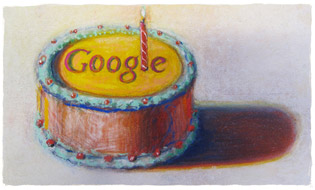
Though Google was incorporated as a privately held company on September 4, 1998, Google's birthday has shifted around over the years, but it currently is celebrated on September 27th. Google is celebrating it's 17 birthday on September 27, 2015. Here, is the Google Doodle for Google's 17 Birthday


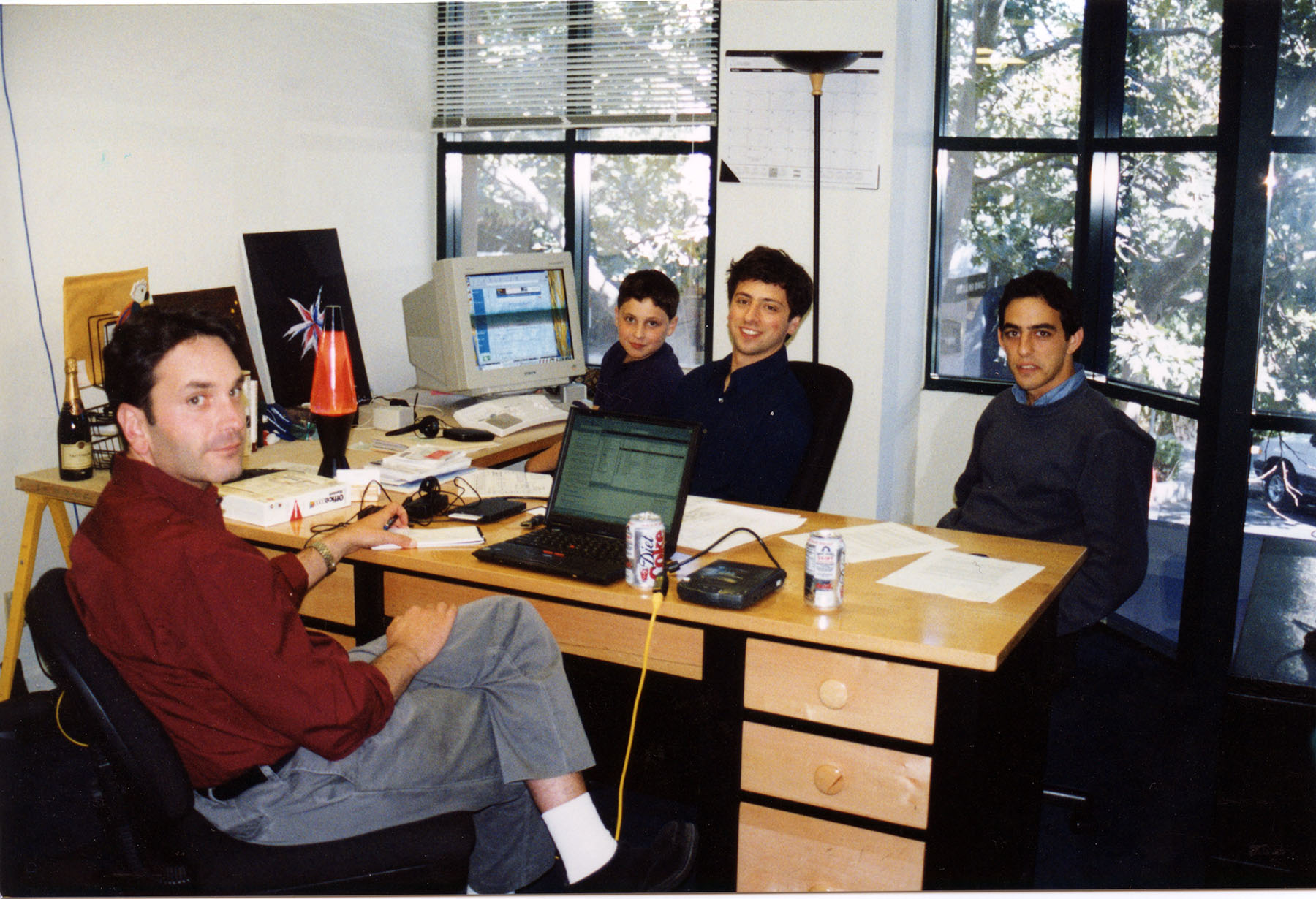
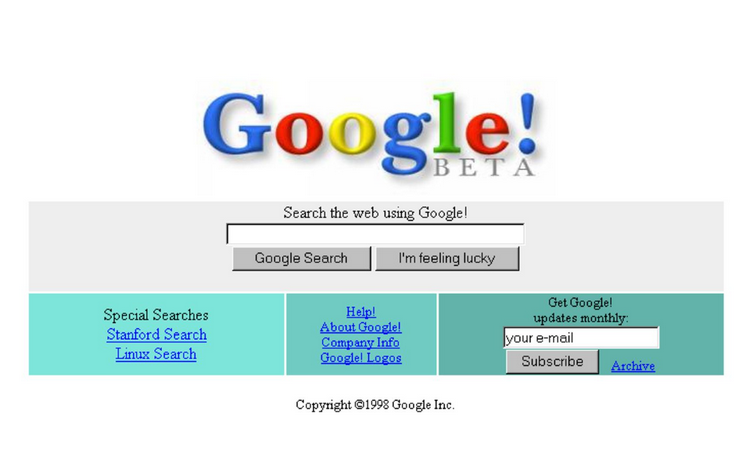
With this Google Doodle, Google want to take a look at its beginning with the first homepage shown on an old computer monitor, Linux Penguin sitting besides the PC, Lava Lamp used to be on on Sergey Brin desk etc.


According to Google, here are the details about the Google Birthday Doodle:

In the world of computer programming, 17 is widely considered the least random number. To assume we made it this far without a little luck, though, would be like assuming lava lamps, turtlenecks, and servers held together by building blocks are harbingers of success. For our 17th birthday, we offer a glimpse into our humble beginnings, when branded hockey jerseys were cool and Savage Garden had a number-one single.

Sometimes you just gotta work with what you have. That’s how you end up with a server made up of toy building blocks.
Not sure what’s more of a relic from a bygone era, the lava lamp or the computer monitor.Linux penguin was always in search of frosty beverages. Naturally.
Inside Google’s first office, also known as Larry and Sergey’s Stanford dorm rooms. They had to find alternative arrangements when the Stanford IT department complained they were sucking up all the bandwidth.

Google’s first homepage (It worked better than it looked.

The office (and attire) may have changed, but the people are still what matter the most.


Google Cache Page Design Change:

Google has change the way it used to show the Google Cached pages many times. Changed the design and also the url http://webcache.googleusercontent.com/ for showing Google Cache.

Earlier, when user used to see the Google Cache of any website from Google search page, they were shown the searched term highlighted.


But Google stopped to show highlighted terms on its cached pages and suggested users to use ctr+f to find the searched term.


Now, today, Google has again changed the Cache snapshot view. Now you can view the "full version", "text only version" and "View source" directly from the cache page. But still the highlighted search terms are missing.


Highlight Google Cache Search Term:

To achieve keyword highlighted in the Cached page view, there are two options. Manually or using the Browser Extensions.

Manually, we can add the wanted words to the q parameter, and let's say we search Google India and want to highlight words: Google India. Our original cache url which is not highlighting any term is:
http://webcache.googleusercontent.com/search?q=cache:Iu-EGyaLG_QJ:https://www.google.co.in/+&cd=1&hl=en&ct=clnk&gl=in

But now, we change the URL by adding the terms google india, by replaceing +&cd to +google+india&cd.
http://webcache.googleusercontent.com/search?q=cache:Iu-EGyaLG_QJ:https://www.google.co.in/+google+india&cd=1&hl=en&ct=clnk&gl=in

Simply, just add your searched terms after the + in the url and you will get to see highlighted search terms.

Also, by using following Browser Extensions (no affiliation with the extension, use at your own risk), one can highlight the searched term:

Chrome

Tampermonkey Extension
https://chrome.google.com/webstore/detail/tampermonkey/dhdgffkkebhmkfjojejmpbldmpobfkfo

Google Cache Highlight Search Query Terms for HTTPS (I am the author of this script)
https://userscripts.org/scripts/show/154167

Firefox

Greasemonkey Extension
https://addons.mozilla.org/en-US/firefox/addon/greasemonkey/

Google Cache Highlight Search Query Terms for HTTPS (I am the author of this script)
https://userscripts.org/scripts/show/154167

Now Signed in Google Users can Show or Hide Private Search Results

When signed in, Google is now giving the option to turn of search personalization direct on the search result page. There are two options when Google is showing private results. The options are not available for all queries. But as per my knowledge only when you have shared or your friends have shared something related to the search query via Google+.

Here, is the screen capture for the two queries one showing private result options and other not:

Show Hide Private Search Results Options in Google Search Page
Show Hide Private Search Results Option is Missing in Google Search Page
When the Globe icon is selected, the private data is hidden but when Human icon is selected the search result is showing private results also. And as per my finding, "Currently showing private results" i.e. Human icon is by default selected. Means by default you will get personalised results in Google search

Disable/Hide Private Results on Google Search

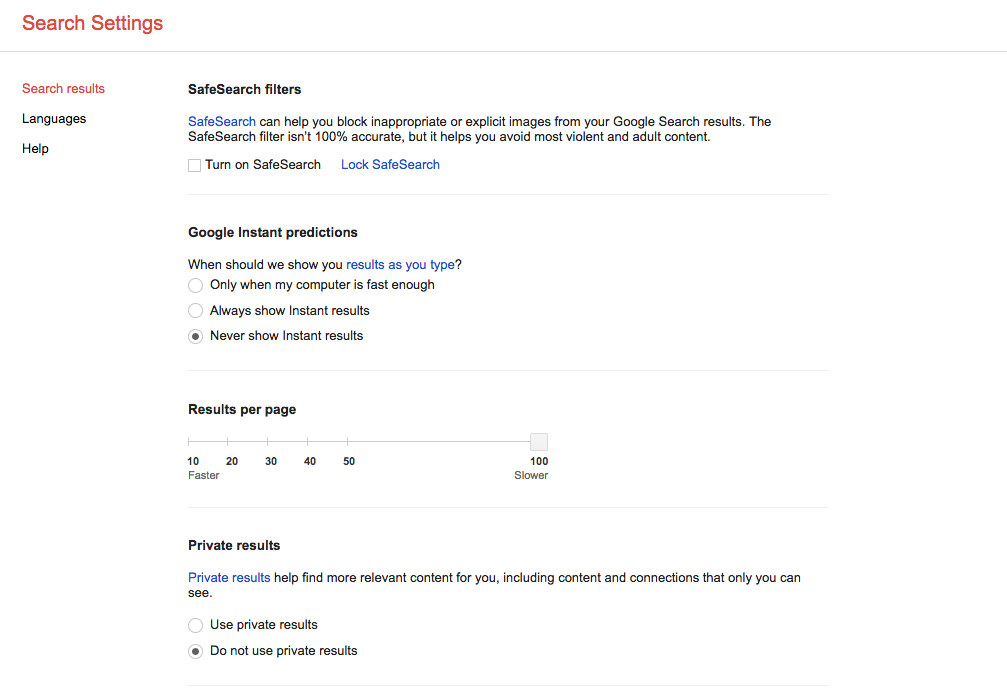
You can easily hide your private results being shown in Google Search results. When login, you just have to visit this Search Settings link: https://www.google.com/preferences?hl=en. Scroll a bit and check the "Do not use private results" radio button.

Private results

Private results help find more relevant content for you, including content and connections that only you can see.
Use private results
Do not use private results

Earth Day 2014 Google Doodle


April 22, 2014 is celebrated as Earth Day around the world. Google too is celebrating 2014 Earth Day via it's interactive doodle on the search home page.

Featuring on the Google's homepage, is an interactive Google Doodle, that changes after every click. With each click, user get the option to change the doodle and option to share or search for that specific animal in the Doodle. This year, Google Doodle for Earth Day 2014 has a lot to say via Rufous Hummingbird, Dung Beetle, Moon Jellyfish, Chameleon, Puffer Fish and Japanese Macaque. 

Images Google Doodle Earth Day 2014

For Earth Day 2014, Google has created 6 different Google Doodles to display wildlife and sea life. Following are the six Google Doodle for Earth Day:

Chameleon Google Doodle Earth Day 2014


Dung Beetle Google Doodle Earth Day 2014

Rufous Hummingbird Google Doodle Earth Day 2014

Japanese Macaque Google Doodle Earth Day 2014

Moon Jellyfish Google Doodle Earth Day 2014

Puffer Fish Google Doodle Earth Day 2014

Google Celebrating it's 15th Birthday with Piñata Game


Google is celebrating it's 15th birthday by displaying an interactive Doodle based on Mexican Piñata game on it's search page. Piñata is a decorated container, made up of papier-mâché, pottery or cloth and is filled with small toys or candy or both. You have to hit the Piñata blind folded to get the goodies and sweets. The Piñata is one of many traditions which are typical of Mexico and is now part of Google legacy.

Search "Google In 1998" For A Flashback

On it's 15th birthday, Google is giving chance to it's users to go to flashback of Google in 1998. Search "Google In 1998" on Google and you will be taken back to what Google was in 1998.

Google Opened Menlo Park House & Garage


Google also opened the Menlo Park house and garage, where the company first started its business. It was opened to the media to celebrate the company's 15th birthday. The garage was rented to Google by Susan Wojcicki, sister of Anne Wojcicki wife of Sergey Brin. Susan Wojcicki, was one of the first hires by Brin and Page in Google Team.


Google has finally replaced the free Google AdWords Keyword Tool with Keyword Planner. As of today, Tuesday,27 August, 2013, when you click on the link of Google Keyword Tool, you will be redirected to Adwords support page explaining about the new Keyword Planner.

Earlier AdWords Keyword Tool was accessible without any login. But now to access the new Keyword Planner, users have to login to their AdWords Account. According to Google, Keyword Planner is built with the aim to bring the functionality of both Keyword Tool and Traffic Estimator. To know more visit Keyword Planner.

Gmail Stealth Ads in Promotion Tab

There is a discussion online that search engines are fading the backgrounds of ads in search results to make them difficult to differentiate between the organic or paid of the search results.  You  can read in detailed in this post. Fearing of Google and Matt Cutts action, I have nofollow the link. Well, back to the ads that are getting difficult to figure out day by day shows how Search Engine big daddies are trying to monetize more, earn more and more from their loyal users. 

Taking this step further, Google is moving ahead of others. They now have stealth the ads as mail in the Gmail's Promotion tab. Here is the screen shot of ads in Gmail inbox:

From above screen capture its difficult to differentiate ads and original promotional mails. Flip your laptop screen to figure out which are ads or mails.

From this, there is always a doubt in the intention of Google's new inventions. The timing of these ads and recent launch of Tabs in Gmail shows that the intention was already set to use this to target users and fool them to click on those ads. Since, these ads are charged only for once you click to the ad and then the motive of Google is fulfilled. On clicking, we get the original Google promotional mail:
The mail stats on the right hand side:
What's this?
It's a new type of ad which you can forward to a friend, or star to save it to your inbox. If you dismiss this ad, you won't see it again.
In start, I thought Google has done a great job to differentiate between different types of mail and classifieds them in different tabs. Indeed they had, but why they are fooling users with the similarity to that of inbox inline.


Eadweard J. Muybridge Google Logo (Doodle) Video


On April 9th, 2012 Google is celebrating the birthday of Eadweard J. Muybridge. Eadweard J. Muybridge born on 9 April 1830 was an English photographer who worked on work on animal locomotion using multiple cameras to capture motion and uses a device zoopraxiscope to project motion picutres.

Here is the Eadweard J. Muybridge Google Doodle 

on Google.com


If you are unable to find where Google is written in the Doodle, just right click on Google Doodle in your Firebox browser and View Background Image. Here, is what you will see:


Google Retiring AdSense for Domains


There is a buzz around the Online Marketing communities about the Google Plan to shut down Google AdSense for Domains. Publisher had received an email yesterday from AdSense about Google shutting down their AdSense for Domains. Google gave a reason for doing so. According to them they have evaluated the benefits of their partner network and hence decided to retire the Hosted domains product within AdSense. This mean it was not a good revenue generating model for Google as advertiser were not getting ROI from advertising on parked domain.

Following is the timeline about Google shutting down yet another product, as stated by Google:
• March 21: You’ll no longer be able to create new Hosted domains
• April 18: Hosted domains will become inactive and it’ll no longer be possible to earn from them
• June 27: Hosted domains will no longer be available in AdSense accounts
How to Migrate AdSense for Domains to a new Domain Parking Provider:


In it's help section for AdSense for Domains, Google has provided with a migration guide about how to migrate AdSense domains portfolio to any other domain parking provider like SEDO. Simply follow the following step stated by Google:
  1. Download your Hosted domains settings from AdSense.
  2. Select a new domain parking provider.
  3. Open a domain parking account.
  4. Register your domains.
  5. Change your DNS settings.

Google is Redirecting to accounts.youtube.com when I log out from Google Account.

A sample URL that generate while logging out is:
http://accounts.youtube.com/accounts/Logout2?ilo=1&ils=s.youtube&ilc=1&continue=http%3A%2F%2Fwww.google.com%2F&zx=-xxxxxxx

I just notice it today due to some problem in my home Internet connection. Due to slow Internet speed, while signing out, I noticed that Google was redirecting to first Google.co.in then accounts.youtube.com.

A thread for this issue has been raised in the Google Help forum for Gmail:
google redirects to youtube upon log out

Across the world this will create a problem in many users' PC who are using Google account services through office network. As, video websites like Youtube and many social networking sites like Orkut and Facebook are in the blocked list of Office Firewall Software. If a user is redirected to http://accounts.youtube.com/, the firewall will stop the further redirects and Signing Out might not work properly.

Till the time of posting non from the Google Employee or Moderator of the forum has replied to the issue raised in the above forum.

Update: Google top contributor TITO DUTTA referred to another thread http://www.google.com/support/forum/p/gmail/thread?hl=en&tid=6f8a66404ae30d1d, where Sarah, a Google Employee replied with the possible solution

Hi everyone,

Sorry for the confusion. When you sign out of your Google Account, we want to make sure we sign you out of all your Google services. We are now checking to make sure you get signed out of YouTube.

Your domain admin can whitelist accounts.youtube.com, which will stop you from seeing the error while allowing your network to continue blocking videos.

Best,
Sarah

Google has made live it's new layout and look for Google.com home page across the world and has also updated the new look and layout for the Search Result Pages.

Google who has favoured white background for last many years has introduced black top bar while replacing the old white background.

Also, removed Advanced Search and Language tool from the Google Search's home page, which used to be near the search box. In the new Google Layout, they are now placed on the top right hand side, under the Options menu, just near the Sign in link.

The new Google SERP's layout has removed "Similar pages" option that used to be on the right of "Cached" link on Search Result pages. The URLs are moved beneath the title/headline for each search result in the search snippet. Also, the left panel has been changed with introduction of new colors and replacing the old blue color.

They have moved the links on the homepage to the top and bottom of the browser screen which according to Google is making the homepage more cleaner.

According to Google their new design is based on the following three design principles:
Focus
Elasticity
Effortlessness

With this new layout and look, Google is hopping that as a user we will get what we want whether we are using mobile devices, tablets, high-resolution monitors and TVs with the use of latest technologies like HTML5, WebGL and the latest browsers.

Google Art Project is a collaboration between 17 of the world’s most renowned art museums and Google. Art Project site enable people to explore museums through Google's Street View Technology and view more than thousand of artworks at an extraordinary high resolution.

At present Google has partner with 17 museums and following are the list of museums included in the Google Art Project:

* Alte Nationalgalerie, Berlin - Germany
* Freer Gallery of Art, Smithsonian, Washington DC - USA
* The Frick Collection, NYC - USA
* Gemäldegalerie, Berlin - Germany
* The Metropolitan Museum of Art, NYC - USA
* MoMA, The Museum of Modern Art, NYC - USA
* Museo Reina Sofia, Madrid - Spain
* Museo Thyssen - Bornemisza, Madrid - Spain
* Museum Kampa, Prague - Czech Republic
* National Gallery, London - UK
* Palace of Versailles - France
* Rijksmuseum, Amsterdam - The Netherlands
* The State Hermitage Museum, St Petersburg - Russia
* State Tretyakov Gallery, Moscow - Russia
* Tate Britain, London - UK
* Uffizi Gallery, Florence - Italy
* Van Gogh Museum, Amsterdam - The Netherlands

All the images of the artworks shown in the Google Art Project site are owned by the museums and protected by copyright. Hence, should not be copied from Google Art Project.

You can watch videos related to Google Art Project on its YouTube Channel.

Happy 12th Birthday to Google!!! 
Google is now celebrating its 12th Birthday with New Google Doodle/Logo.

Google is celebrating its birthday on 27th September instead of 7th September with a new Google Doodle. Following is the new Google Doodle that has been used for its 12th Birthday.
 Happy 12th Birthday Google by Wayne Thiebaud. Image used with permission of VAGA NY.
Image used above is a direct link to the server Location of Google's Logo and all rights goes to Vaga NY
As per the Google Tool Tip for the Doodle, the image is used by taking permission from Visual Artists and Galleries Association, Inc. and is designed by Thiebaud, Wayne of VAGA. According to Vaga.org:
VAGA is an artists rights organization and copyright collective representing reproduction rights (copyright) for approximately 500 American artists and, through agreements with affiliated organizations in other countries, thousands of foreign artists worldwide.
This means that the Google's 12th Birthday Doodle is designed outside the boundary of Google Inc. and Google has to use this copyright protected image by taking permission from VAGA.

Well that does not matter to us, we love Google and wish to see it gives the best results in future and should be remain free from any of Board of Directors profit making/financial interests.

 Instant Coffee, Money & Now Instant Search:Google Instant

Sep 8, 2010: Google has added a new feather to its crown and launched new searching feature: Google Instant. As you start typing a single word on Google, search result page will be served to you instantly. According to GOOGLE:
Google Instant is starting to roll-out to users on Google domains in the US, UK, France, Germany, Italy, Spain and Russia who use the following browsers: Chrome v5/6, Firefox v3, Safari v5 for Mac and Internet Explorer v8. Please note, users on domains other than Google.com can only access Google Instant if they are signed in to a Google Account. We will continue to add new domains and languages over the next several months.
Below is the image of Google Instant Search Text Suggestion, having On/Off link next to it.

PAC-MAN 30th Anniversary:Google Celebrate with Interactive Doodle:

21 May 2010, Google is celebrating the 30th anniversary of Pac-Man with a playable logo on its home page. Google pays tribute to all time world famous game: Pac-Man 30th Anniversary with a free version of the video arcade game on the home page logo. Google make public its first interactive doodle to celebrate PAC-MAN's 30th anniversary. Play the game using your keyboard’s UP, Down, Right and Left keys and enjoy it.


                                           PAC-MAN 30th Anniversary Google Doodle

Update: Play this game whenever you crave for Pac-Man by visiting the following link: http://www.google.com/pacman/
Just click on Insert Coin button once to start the game.

Today(Wed, April 14, 2010) after updating Google Toolbar, the cache function of PageRank Tool under Google Toolbar is not working. I am able to check the cache of any page through cache option shown in the Google Search snippet, but when I go for the toolbar cache version I am seeing a 404 Error. Following is the snapshot of the Google Toolbar's cache version of Amazon website:

Google Toolbar Error-404 Not Found Error

Also, the Google cache: command is not working. It too is showing 404 Not Found Error.

If you are seeing t he similar thing, please let me known by inputting your valuable comments...

Earlier Google used to show cache for a website abc.com like this:
http://74.125.153.132/search?sourceid=navclient-ff&ie=UTF-8&q=cache%3Ahttp%3A%2F%2Fwww.abc.com%2F

But now it has changed the url to http://webcache.googleusercontent.com/... like this:
http://webcache.googleusercontent.com/search?q=cache:5rXV0ZMvlY0J:www.google.com/intl/rm/remove.html+google+cache+urls&cd=2&hl=en&ct=clnk

There seems to be lot of changes in April month. Earlier a PR and backlink update on 3rd April, 2010. Know change in the url for Google Cache version.

Also, when you search on Google with this webcache.googleusercontent.com, you will find in a search result a link to cache page url i.e: http://webcache.googleusercontent.com/search?q=cache%3Awww.leechermods.com.

Or just Google this:
site:webcache.googleusercontent.com webcache.googleusercontent.com

you will find about 1,100 results.

Its interesting to see Google is showing cache version in its search result.

Google Web History to Display Search Results Even when You or I are NOT SIGNED IN:

Before going to discuss on the topic, I will like to let you know what Google Web History is. According to Google:

With Web History, you'll be able to:

* View and manage your web activity.

You know that great web site you saw online and now can't find? From now on, you can. With Web History, you can view and search across the full text of the pages you've visited, including Google searches, web pages, images, videos and news stories. You can also manage your web activity and remove items from your web history at any time.

* Get the search results most relevant to you.

Web History helps deliver more personalized search results based on the things you've searched for on Google and the sites you've visited. You might not notice a big impact on your search results early on, but they should steadily improve over time the more you use Web History.

* Follow interesting trends in your web activity.

Which sites do you visit frequently? How many searches did you do between 10 a.m. and 2 p.m.? Web History can tell you about these and other interesting trends in your web activity.

Google Web History to affect search results only when you or I are signed in on Google. But with new Google Web History, you will find personalized search results based on your online behavior even when you are not signed in. Now when you search on Google your will find Web History at top right hand side of the search page near Search Settings and Sign in.


When you click on this Web History link, you will find:

Your search results may be customized using search activity from this computer.
Disable customizations based on search activity.

You can click on the above link to Disable customizations or enable it

Customization based on signed-out search activity is disabled.
Enable customizations based on search activity.

Now with this new feature, your search will not only be based on your Geographical Location but also on your online search activities on your computer.

Google Search to Go Live with Caffeine Update After Holidays

History is repeating itself with the roll out of Caffeine Update on all Google Data-centers in the winter season of holidays. Time of Florida Update was the peak season of sales for the webmasters. That update hurt lot of webmasters as with the change in Google search algorithm many of them lose huge amount of traffic. This time Google doesn't want the webmaster to loose traffic with the Caffeine roll out. So the Caffeine Update will be roll out on a single data center and after holidays Google will roll out on all the data centers.

Google has also closed the Google Caffeine Sandbox test by giving a 302 redirect .

I have checked the redirect on the Internet Officer tool and got this response:

Checked link: http://www2.sandbox.google.com/

Type of redirect: 302 Found

Redirected to: http://www.google.com/errors/caffeine/unavailable.html

Wait and watch for Google Caffeine Update to go live, after the holidays. There might be many webmasters that are going to enjoy Christmas and New Year but some of them might not with this Google Update.

Is this update going to change the SEO technique?
Will Google be able to maintain the leadership in the Search Market Share with new Update?

Google Preferences Goes Missing from Search Page:

Update:
Google has shift the Google Preferences option the to the row, just below the search box after searching. You can find link to Google Preferences under Settings >> Search Settings.

To change your Google Preference, when you search for a particular keyword you will see a search page. Just below the search box click on Settings and then click on Search Settings and you will find your Preferences option.

Under Google Preferences you have the Search results option of SafeSearch filters, Google Instant predictions, Results per page, Private results, Where results open and Search history. You can adjust these as per your choice and save it/them.

There is also the option of searching in different languages and which language Google products show while you use them. Choose your native language and don't forget to save it.


Google has removed Preferences link from Google.com. Earlier you would see three links
Advanced SearchPreferences
Language Toolsnext to search box. But now the preferences link is missing from the search page. You will find only
Advanced Search
Language Tools

Apart from latest Search Engine Ranking updation that was done around mid Aug,09 , Caffeine update and now visual display update ; what else is Google Going to change.

Update:
You can find your old Preferences in a new name as Search settings on the upper Right Hand Side with Sign in link as:


Favorite SEO Blogs

Favorite SEO Tips Blogs

Favorite Google SEO Tips Blogs