Showing posts with label Google Update. Show all posts

Google has made live it's new layout and look for Google.com home page across the world and has also updated the new look and layout for the Search Result Pages.

Google who has favoured white background for last many years has introduced black top bar while replacing the old white background.

Also, removed Advanced Search and Language tool from the Google Search's home page, which used to be near the search box. In the new Google Layout, they are now placed on the top right hand side, under the Options menu, just near the Sign in link.

The new Google SERP's layout has removed "Similar pages" option that used to be on the right of "Cached" link on Search Result pages. The URLs are moved beneath the title/headline for each search result in the search snippet. Also, the left panel has been changed with introduction of new colors and replacing the old blue color.

They have moved the links on the homepage to the top and bottom of the browser screen which according to Google is making the homepage more cleaner.

According to Google their new design is based on the following three design principles:
Focus
Elasticity
Effortlessness

With this new layout and look, Google is hopping that as a user we will get what we want whether we are using mobile devices, tablets, high-resolution monitors and TVs with the use of latest technologies like HTML5, WebGL and the latest browsers.

Google Web History to Display Search Results Even when You or I are NOT SIGNED IN:

Before going to discuss on the topic, I will like to let you know what Google Web History is. According to Google:

With Web History, you'll be able to:

* View and manage your web activity.

You know that great web site you saw online and now can't find? From now on, you can. With Web History, you can view and search across the full text of the pages you've visited, including Google searches, web pages, images, videos and news stories. You can also manage your web activity and remove items from your web history at any time.

* Get the search results most relevant to you.

Web History helps deliver more personalized search results based on the things you've searched for on Google and the sites you've visited. You might not notice a big impact on your search results early on, but they should steadily improve over time the more you use Web History.

* Follow interesting trends in your web activity.

Which sites do you visit frequently? How many searches did you do between 10 a.m. and 2 p.m.? Web History can tell you about these and other interesting trends in your web activity.

Google Web History to affect search results only when you or I are signed in on Google. But with new Google Web History, you will find personalized search results based on your online behavior even when you are not signed in. Now when you search on Google your will find Web History at top right hand side of the search page near Search Settings and Sign in.


When you click on this Web History link, you will find:

Your search results may be customized using search activity from this computer.
Disable customizations based on search activity.

You can click on the above link to Disable customizations or enable it

Customization based on signed-out search activity is disabled.
Enable customizations based on search activity.

Now with this new feature, your search will not only be based on your Geographical Location but also on your online search activities on your computer.

Google Search to Go Live with Caffeine Update After Holidays

History is repeating itself with the roll out of Caffeine Update on all Google Data-centers in the winter season of holidays. Time of Florida Update was the peak season of sales for the webmasters. That update hurt lot of webmasters as with the change in Google search algorithm many of them lose huge amount of traffic. This time Google doesn't want the webmaster to loose traffic with the Caffeine roll out. So the Caffeine Update will be roll out on a single data center and after holidays Google will roll out on all the data centers.

Google has also closed the Google Caffeine Sandbox test by giving a 302 redirect .

I have checked the redirect on the Internet Officer tool and got this response:

Checked link: http://www2.sandbox.google.com/

Type of redirect: 302 Found

Redirected to: http://www.google.com/errors/caffeine/unavailable.html

Wait and watch for Google Caffeine Update to go live, after the holidays. There might be many webmasters that are going to enjoy Christmas and New Year but some of them might not with this Google Update.

Is this update going to change the SEO technique?
Will Google be able to maintain the leadership in the Search Market Share with new Update?

Google Preferences Goes Missing from Search Page:

Update:
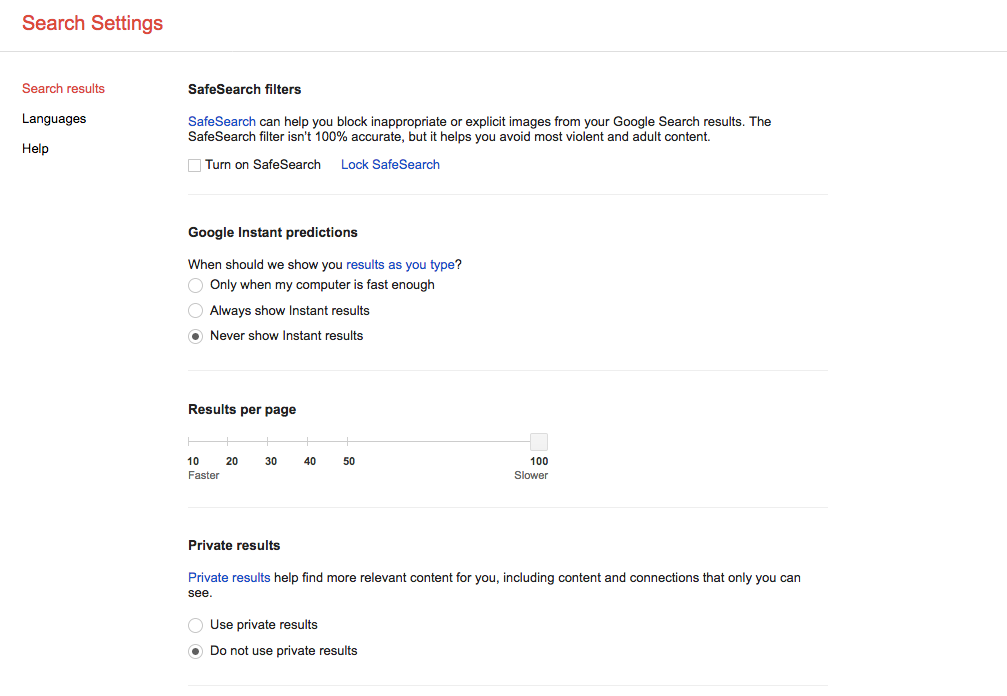
Google has shift the Google Preferences option the to the row, just below the search box after searching. You can find link to Google Preferences under Settings >> Search Settings.

To change your Google Preference, when you search for a particular keyword you will see a search page. Just below the search box click on Settings and then click on Search Settings and you will find your Preferences option.

Under Google Preferences you have the Search results option of SafeSearch filters, Google Instant predictions, Results per page, Private results, Where results open and Search history. You can adjust these as per your choice and save it/them.

There is also the option of searching in different languages and which language Google products show while you use them. Choose your native language and don't forget to save it.


Google has removed Preferences link from Google.com. Earlier you would see three links
Advanced SearchPreferences
Language Toolsnext to search box. But now the preferences link is missing from the search page. You will find only
Advanced Search
Language Tools

Apart from latest Search Engine Ranking updation that was done around mid Aug,09 , Caffeine update and now visual display update ; what else is Google Going to change.

Update:
You can find your old Preferences in a new name as Search settings on the upper Right Hand Side with Sign in link as:

Google Favicon
Google is know showing Favicon for the cached version of websites. In my notice, it is visible only in Mozilla Firefox. Tried to see the same in IE7, but couldn't find any. One can see this Favicon only if the visited website doesn't have any its own Favicon. If it does have, then the Full Version of Google Cache will not display any Favicon. To see it, one have to go for Text-Only Version of Google Cache.
Along with cache: command, this new Favicon is viewable when we use the following site:, link:, info: commands.

Update: Now the new favicon for Google is visible in almost all Google's Products. It contains the colours seen in Google Logo, that are RGB (RGB color model) plus Yellow and White(added in the favicon to make g).


The above image display the Google ad running on Google.co.uk for the search keyword- secured loans.
On clicking the drop down menu, you can see different loan amounts. This ad look unique in its own way. I had never seen such type of ad running on Google Adwords. This is a new beta version of Google Merchant Search Beta, where user can compare sponsoring lenders for secured loans. Another way of earning by Google.

Google will be launching the beta version of Google Chrome today in more than 100 countries. Visit official Google Blog

View the first images of Google Chrome.

Google have added a link to their comic book explaining Google Chrome.

Google has introduced a new feature in its search page. It has replaced News with + Search Options:
This feature has many options. Like you can check the pages by the time of page created i.e page created in the past day, week, month or a year. And also for each page show you can select the Standard View, Longer Text, Dates and Places, and images from the page.

But the above option is not showing in all browser and for different user it is not available. So what is this? Is this a new trend that Google is trying to introduce. Or this is the reason for the continuous Google Dance or YO-YO in this month of July? Well this will come to us in future or might not......

Does Google has shed its image of updating visible Toolbar PageRank quarterly? Since October 2007, webmasters have noticed update in PR every month. A recent Google Toolbar PR update has been noticed across the world in the last week of Feb 2008.


Favorite SEO Blogs

Favorite SEO Tips Blogs

Favorite Google SEO Tips Blogs